Plans and billing
How plans unlock features, how to upgrade from anywhere in the dashboard, and what changes when you switch.
Every hosted workspace starts free. A paid plan turns on sending from Warmbly Cloud, the unified inbox, contacts, the CRM, automations and integrations.
Upgrade your plan
Open a feature your plan does not include, or choose Change plan under Settings > Billing.
Pick a plan, and monthly or annual billing.
With no subscription yet, finish in Stripe Checkout. An existing subscription switches in place.
Good to know
- The free workspace warms up to 10 mailboxes.
- Annual billing is 20% off the monthly price.
- Only the workspace owner can change the plan.
- Cancelling keeps the plan active until the end of the paid period, and the workspace keeps its mailboxes, warmup and settings.
- A workspace that only warms can take the Warmup plan: $15 a month, or $144 a year.
Every hosted workspace starts free. The free workspace warms up to 10 mailboxes, connected on the cloud or through a linked self-hosted instance. Sending from Warmbly Cloud, the unified inbox, contacts, the CRM, automations and integrations turn on with a paid plan. A workspace that only warms can take the Warmup plan instead.
Dedicated reviewer workspaces show Test in the header instead of a customer plan. They have operator-granted, time-limited access, not a purchased subscription. Joining an existing workspace as a tester does not change its plan badge. See reviewer accounts.
| Plan | Monthly | Annual (per month) | Sends per day | Includes |
|---|---|---|---|---|
| Starter | $29 | $23 | 150 | Unlimited warmup, unlimited mailboxes, unified inbox, team invitations, bulk contact operations |
| Grow | $89 | $71 | 3,000 | Everything in Starter |
| Business | $329 | $263 | 15,000 | Everything in Grow, sending kept apart from other customers, webhooks, advanced outreach |
| Enterprise | Custom | Custom | 15,000+ | Everything in Business, dedicated support |
Annual billing is 20% off the monthly price. The same lineup is on the pricing page.
Unlimited mailboxes means exactly that, under a fair-use allowance of one mailbox for every send a day the plan includes: Grow holds 3,000, Business 15,000, and either can be raised on request. See mailbox allowance.
The Warmup plan
The Warmup plan is for a workspace that only warms mailboxes and does not send from Warmbly Cloud: $15 a month, or $144 a year. It moves the workspace's mailboxes into the premium warmup pool, which is built for inbox placement:
- Better deliverability. Warmup mail is exchanged with paying senders first. A free mailbox is let in only after it has been a healthy pool member for at least three days, in a workspace in good standing.
- Reputation protected. A partner that complains, bounces or tampers with warmup mail is pulled from the pool well before mailbox providers would act, and one landing in spam is slowed down, so a struggling mailbox cannot drag yours down. See pool safety.
- Priority matching. Premium mailboxes are given partners before the free pool is.
- No mailbox cap. Every mailbox the workspace holds warms, whether it is connected on the cloud or through a linked self-hosted instance.
It is not a self-hosting plan; it is the plan for warmup on its own. Everything else is exactly as on a free workspace: sending, the unified inbox, contacts, the CRM, automations, integrations, AI and team invitations still need one of the plans above. The dashboard keeps those pages locked, and the server refuses sending, the inbox, AI, integrations and placement tests to a Warmup workspace the same way it refuses them to a free one. Any of those plans includes everything the Warmup plan does.
It has no card in the plans grid. The ways in are the Upgrade button on the Mailboxes page, the Only need warmup? row on the billing overview of a free workspace, and the Premium button on a linked instance's Settings > Warmbly Cloud page. Each opens the same dialog: pick monthly or yearly, then checkout. Once active the header badge reads Warmup, and the overview shows it like any other plan, with the same cancel and resume controls. Its usage section shows the one limit it has, mailboxes, which reads unlimited.
When you open something your plan does not include, the dashboard opens a full-screen plan chooser instead of sending you to settings. It names the feature, highlights the plan that unlocks it, and lets you pick monthly or annual billing.
- No subscription yet. Choosing a plan opens Stripe Checkout. When you come back, you land on the page you left with the feature unlocked.
- Already have a Stripe subscription. Choosing a higher plan switches you in place. The change is prorated and takes effect immediately.
- Enterprise. Opens an inquiry form so you can reach us about custom volume.
Promo codes can be applied in the chooser before checkout.
Warmbly is sold to businesses only, so checkout asks for your company's legal name. Add your VAT or other business tax ID there too if your company has one. Stripe puts both on your invoices. Prices exclude taxes: where Warmbly is required to charge sales tax, VAT, or GST, Stripe adds it based on your billing address, and where it does not, your business accounts for any tax due in its own country, including under the reverse charge.
Only the workspace owner can change the plan. Other members see the same comparison with a note to ask the owner. Which roles can do what is covered in Team and roles.
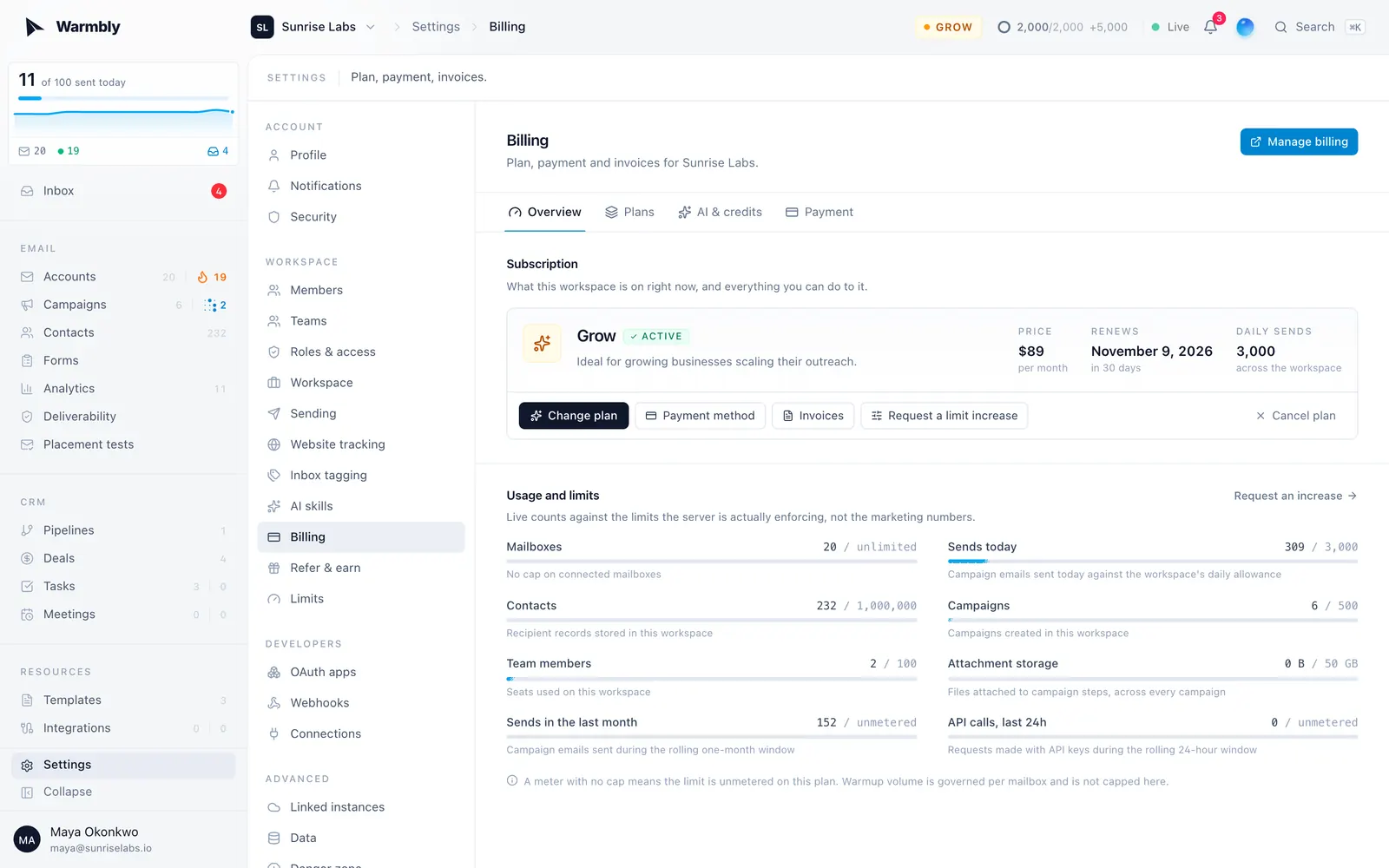
Settings > Billing is owner only and splits into four tabs, each with its own link.
Overview is the control panel for the subscription.
- The plan card shows the plan, its status, the price (per year on a yearly subscription), and the renewal or end date. Change plan opens the same chooser the locked features use.
- Cancel plan schedules the cancellation for the end of the paid period. The plan stays fully active until then, and Resume clears it with one click. Nothing is lost either way: the workspace returns to the free tier and keeps its mailboxes, warmup and settings.
- Usage and limits shows live counts against the limits the server actually enforces, for mailboxes, sends today (the cap the sender applies, or unlimited on a plan without one), contacts, campaigns, team members, attachment storage, sends this period, and API calls. A meter turns amber past 70% and red past 90%. A meter with no cap means that limit is unmetered on your plan. A workspace that does not send (free, or on the Warmup plan) sees only the mailbox meter, because none of the others applies to it. The mailbox meter says where its number comes from (fair use, an approved request, or the free allowance), and the storage meter says so when a plan change left the workspace over its quota: existing attachments keep sending, and new uploads wait until you are back under.
- Banners appear only when something needs a decision: a failed payment, a scheduled cancellation, or a trial about to end.
Need a single limit raised without moving plan? Request an increase from Settings > Limits, linked from the usage section, or straight from the connect dialog when it is mailboxes you need. An operator reviews it and the approved limit takes effect on the workspace, including the daily send allowance the sender enforces. The page shows how much of each limit the workspace uses, and a limit your plan leaves unlimited (mailboxes, on a plan whose daily sends are uncapped) is not offered, because there is nothing to raise. A workspace that does not send can only ask for more mailboxes.
Plans compares the lineup as full plan cards, with the best value plan highlighted. For an existing Stripe subscription, monthly plan cards preview the estimated proration and next billing date. Stripe calculates annual proration when you switch. Promo codes and the codes this workspace has redeemed live here too.
AI and credits covers the credit balance, top-ups and usage. See AI credits.
Payment links out to the Stripe billing portal. Cards and the billing email are held by Stripe and never touch Warmbly, so they are read and changed there. Invoices and PDF receipts live in the portal too.
The portal also lets the owner update the billing address, legal billing name, and business tax ID. Update these details before the next renewal if the company moves or its tax registration changes.
The portal requires a billing account created through checkout. If your workspace has never completed checkout, including a free workspace or one with only an operator-granted plan, the payment tab explains that checkout is required first and links to the plan chooser. Portal and cancellation controls only appear when the corresponding billing account or Stripe subscription exists.
A workspace can be put on a plan without paying for it. Warmbly calls this a managed plan, and it exists for internal workspaces, design partners and support gestures.
A managed plan entitles exactly what the plan entitles. Nothing about the product behaves differently, and nothing is charged: no Stripe subscription is created, no invoice is raised, and the billing page still shows what the workspace would pay. The grant carries the reason it was made and who made it, and it can be open-ended or given an expiry date, in which case it lapses on its own.
Upgrading a workspace with only a managed plan opens Checkout to create a Stripe subscription. Proration previews and cancellation apply only to an existing Stripe subscription. If the selected billing interval has no configured price, the dashboard explains that the plan is unavailable instead of redirecting to the portal.
Operators grant one from the admin panel on the workspace, under Plan. The organization list marks granted workspaces with a managed badge and can filter to them, so "who is paid because we said so" is answerable without checking Stripe. A grant that has lapsed keeps its reason on file and is shown as grant lapsed rather than disappearing.
A grant is held beside the plan a workspace pays for, never on top of it, so a paying workspace that is granted a different plan goes back to the one it pays for when the grant ends. Revoking returns the workspace to whatever it actually pays for, which for most is the free plan.
One thing a grant does not do: monthly AI credits are granted when an invoice is paid, and a granted plan raises no invoice, so a managed workspace does not receive a recurring credit allowance. Top up its balance directly if it needs credits.
A self-hosted instance running without a billing provider has every feature unlocked and no billing page. See Warmbly Cloud for how a self-hosted instance links to a hosted workspace.